Quick Guide

Note: Everything here is based on a prototype of the game.

Rogue Angels game information:

=> BoardGameGeek
=> Official Website
=> Facebook Page
=> Instagram
=> Twitter (wants to be called X)
=> Kickstarter (closed but viewable)
=> Gamefound (you still can preorder it / pledge for it)
=> Rules

=> The Video that first got me interested in the game (TableTop Tolson – one of my favorite reviewers)
=> The Video that rekindled that interest (Inspired 2 Game – one of my favorite reviewers)
=> Excellent under 10 minute review (Dice Treasures – even has the black dice and numbers on standee bases)
=> Nearly 100 short 1 minute video clips
=> One A Day Video Clips

=> Video Playlist (a short select collection of videos about the game)
=> Background Music (as you play the game)

Rogue Angels is using Gamefound for the Pledge Manager.

=> Rogue Angels <=get your copy on Gamefound

* Art and Info provided with permission from Sun Tsu Games who kindly sent me a prototype!

Featured post

I can do it (LARGER)

I don’t have any fancy cool graphic editing tool on my Chromebook. So I was happy to use the uncropped Action Card images. Yeah, they had significant extra graphics along all four sides which made everything look smaller when I fit them into a normal card size image. But it was the best I could do with what I had.

Well … I decide that getting the Action Card images full size would be worth paying for an online graphics photo editor called PIXLR. So now I am redoing (yes doing them all over again) all the Action Cards making them full size! You should see the difference! The font size appears to be about 1 or 2 points larger (and of course the icons and images are larger on the card now too).

Here is an example showing an original uncropped Action Card and the cropped full size card.

First … the image I received (uncropped):

Next … after I cropped it (just like the cards will get CUT):

And here they are … side by side (easier to see how the one on the right is much easier to read and see the icons):

Font, icons etc will all be LARGER in cards in the final game

As you look at my short articles about the changes to the Hero Action Cards (or on the full sets in the Proto Upgrade page) you might think that the size of the font and icons looks smaller. Well … that is **MY** fault. True. I don’t have cool graphic illustration tools at my disposal. The images of the final Action Cards that I have include the area of the card that is TRIMMED! There probably is a name for this:) They make the image much larger so that when it is trimmed, even if it is cut slightly off, it will still look good! I am thinking that this extra on each card might actually make the card image 12% larger … so if I print that LARGER image on a NORMAL size card I will be REDUCING it … making it SMALLER! So … look forward to the action cards in the final game having a much larger look to the images, icons and fonts!

Here … let’s see if I can show this visually. Here is a final Action Card with all the trim area included. Next I marked where the card will likely actually be cut. This shows how much trim area was included:

Or maybe a better way to visualize it would be with a change in the font size. When I reduce the size of an actual Action Card image that includes the trim area, I reduce it enough that the font size is probably at least 1 point smaller (likely even smaller than that). Here is another visual for you to see how this seemingly small difference can actually make a HUGE difference when glancing at an Action Card. Consider the font being 1 or 2 points larger … and wouldn’t it be way way easier to read?

So … I definitely look forward to that slight (but significant) increase in the final game!

Maybe I can try to trim off the excess in the card images. But it would take ME a long time since I have no easy way to do it :(

If you are one of the 49 with a prototype

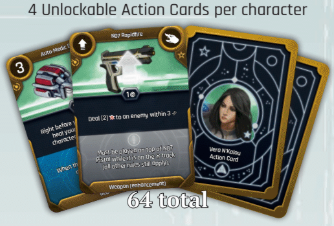
If you are fortunate and have a prototype, you now can upgrade it to have the FINAL Action Cards. I have access to the 224 final Action Cards and have permission to share them.

I can fit 8 full sized cards on one page, then share it as a PDF for you to grab and print. Then, if you sleeved your cards, just cut out the new final Action Cards for your Heroes and slip them in front of the original Action Cards!

I put all 7 standard final Action Cards for each Hero on one sheet. I used the 8th spot to provide notes on everything that changed in the final cards (so you know what to try out!). Even if you don’t have a prototype, you are welcome to take a look at all the final Hero Action Cards!

One page for each of the SIXTEEN HEROES is on this page:
=> Proto Upgrade

And for those who want to do a run through with a couple Heroes final Action Cards … make sure you also use the updated Campaign Books (just view pages online as you go … or print all the pages (like I did) and spiral bind them:)
=> Campaign Chapter 1
=> Campaign Chapter 2
=> Rulebook (near final)

I reduced one of the sixteen pages to include it here as an example of what the pages look like (though if you open the image in a new tab it will be larger). I chose Sigyn since all five of her Action Cards were updated!

Updated Look at Laelia’s Action Cards

Laelia is another of our 16 heroes who had all five or her Action Cards updated.

The red boost was completely changed. It used to give you 4 rerolls on your next action this turn. Now it gives you a +1 instead. The +1 does help you plan your next move better I think :)

However, the nicest change was extending the range for healing someone to 5 (it used to be 4). This lets you heal another hero from quite a distance … and not just to remove one damage card, but to remove two!

Continue reading “Updated Look at Laelia’s Action Cards”

Updated Look at Gia’s Action Cards

Gia U’Coni is one of four Heroes that has had all five of her Action Cards updated. Let’s take a look at those five standard Action Cards, starting with her very UNIQUE card:

Gia is the only hero with the ability to cloak (just like Klingons do in Star Trek). And just like Captain Kirk could KIND OF determine where a cloaked Klingon ship was, enemies do kind of know where you are and can move towards you. However, they do not know exactly where you are so they cannot target you in an attack. But, also like how a Klingon ship had to become visible again to attack, you lose this card and it’s ability if you attack or interact with an object! However, you CAN be damaged by global or indirect effects. If a mission has rocks fall on the square that you are on, those rocks WILL hit you! :) Oh … and what changed? The yellow boost now gives you TWO additional dice (before it was only 1 die). Also note the icon in the top right of the card … that icon means the card stays active as long as it is on your cool down track!

Continue reading “Updated Look at Gia’s Action Cards”

An Updated Look at our 16 Heroes (coming up next)

Next … I am planning an updated look at our SIXTEEN HEROES! I think every single one of them has been updated from the prototype to the final game! So… stay tuned!

Probably will start with a look at the Heroes who had EVERY ONE of their Action Cards updated:

  • Xalia
  • Laelia
  • Gia U’Coni
  • Sigyn

First Look at tracking damage inflicted on an enemy

Let’s take a look at actually using the cool rotating health dials within the base of an enemy!

The Rulebook includes an example, so let’s use that example. Here it is from the bottom of page 24 … first (since that is what we are looking at) take a look at the enemy standee that gets inserted into its cool rotating dial base. In this example, the enemy is RED #1 … so that is the base cover that is used:

The dial started showing enemy health of 4 (top) and then shows enemy health of 1 (bottom).

Next … we will be using one of Memnon’s Action Cards for this example. In the prototype, the weapon was named K90 CC Gun … in the final game the weapon is called K90 Rifle as shown here:

Continue reading “First Look at tracking damage inflicted on an enemy”

Ohhhhh … Brilliant acknowledged!

There are a few game companies that I admire for not only putting out great games, but also for providing superior support (and communication) as well as trying their best to help the gaming community.

Stonemaier Games is one of those great game companies.

I was looking at Emil’s game prior to Rogue Angels: Legacy of the Burning Suns … it was simply called “Burning Suns“. It created and defined the universe that we find ourselves in when we play Rogue Angels. Well … Jamey (head honcho at Stonemaier Games) posted a short overview of a mechanism that Emil included in Burning Suns that Jamey considered BRILLIANT. True! Take a peek at how Jamey put it:

Congratulations Emil … and, I think that Rogue Angels also has a few brilliant aspects to it as well.

First Look at Player Aid card

I asked Emil about the Player Aid card … and he has now shared it with us! It also answered my question to Emil about an icon glossary! Here is the near final (v8) front and back:

and

Watch for another quick article to run through some of the key points on this card!

First Look at Enemy Standee Bases (with built in damage tracking)

When playing Rogue Angels prototype, I used really tiny D6 dice to keep track of the health remaining for enemies. For the curious, I used different colored Koplow 8mm dice for this.
=> Koplow 8mm D6 dick pack (Amazon – look at the comments to see how MANY people are using these tiny dice to track damage etc)

But now we can take a peek at how the final game will utilize the base for the enemy standee to track it’s health as a DIAL that you can turn as it takes damage! This appears to be a fantastic way to handle tracking enemy health! And page 6 of the rulebook includes  a look at these near final enemy rotating bases!

Continue reading “First Look at Enemy Standee Bases (with built in damage tracking)”

Create a website or blog at WordPress.com

Up ↑