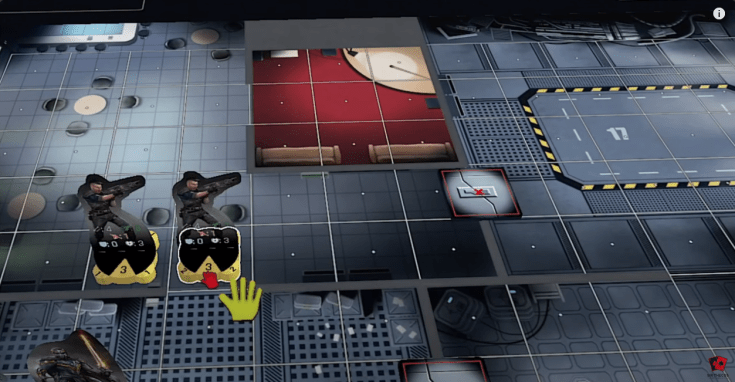
He is SUPER EXCITED about Rogue Angels! Character development. Cycle through your action pool. Upgrade your characters. Story choices matter. So many cool things going on.
There are now 100 English language videos covering Rogue Angels (and another 20 in other languages). I created a 1 minute clip from each of the English language videos so you can get a quick overview of the MANY reviewers take on Rogue Angels! See the full list of video clips (most recent at the top) here:
The Chapter One Campaign book is 230 pages … and Board Game Officer has recorded a complete playthrough of that entire campaign (full of spoilers, of course).
Wurfel Reviews also really enjoyed playing Rogue Angels. He liked the card play with the Action Cards. And he totally liked how the missions were so varied! He enjoyed the mission where he needed to try going stealth. Also how you need to take care with interacting with items. Plus how there are different paths through the campaign. Everything is clear. Everything is good.
Here is a 30 minute video from The Dice Treasures that explains how Rogue Angels works… the action cards, the dice, the movement, range, line of sight, interaction, damage cards, healing and most of all … with the enemies :)
You can watch the full video here, but also (if you are like me) you will find a text article below the video window that provides the same information including time stamps to where the information is in the video (along with some added information that I might add as I go through the video with you)!
The Dice Treasures obviously spent HOURS preparing for this video (not to mention the hours spent learning the game). In my first few games that I played I discovered that I was making several “obvious” mistakes (they just weren’t obvious to me at the time). Plus in my games I kept forgetting to move the turn marker as well as forgetting which players had taken their turns (I forgot to flip the active tokens). So, as I am learning this game, I was excited to see this extremely detailed How To Play. In case others are using this video to explain the game flow, I am including notes about things that seem to have been forgotten (just like I forgot so many things)… but it just seems that forgetting is part of the game when we are starting it :)
If you are here to Learn With Me, then I will include a note where something was forgotten or misstated (I double checked with the game developer)
Video first (text with my added tidbits below it):
0:38 – Start a Mission. Begin each mission with the Mission Layout in the Campaign book (which follows the Mission Brief)
For information about the various components and how they are setup, watch the previous excellenty video which explains them: =>Detailed Components and Setup (text and video)
This is an excellent overview of Rogue Angels and the video is extremely well done! It even includes the black dice (as planned for the final) and numbers on the standee bases (also planned for the final game). He totally enjoyed the game: Not very complex. Even inexperienced game players could enjoy this game. Notice the black dice and numbers on standee stands. 2 thumbs up!
Now that the Kickstarter campaign is concluded, you can Late Pledge for Rogue Angels on Gamefound! Current cost is €112 =>Rogue Angels Late Pledge (Gamefound)
You also can update your pledge or add more copies now on Gamefound as well.
Gamefound has a feature called StretchPay that lets you pay in installments.
Shipping cost will not be collected yet (waiting for the manufacturing to know the exact weight of the game and final shipping date).
An extensive update for Rogue Angels on Tabletop Simulator was finished in October. It now matches the physical prototype and has the latest additions of artwork, icons, cards, rulebook, etc. [Len’s note: many of the Action cards can be seen in various articles here onMyRogueAngels.com]
Rogue Angels on Tabletop Simulator will continue to be updated so that playtesters can continue their journey through the stars :)
They are developing scripts to translate campaign book data into styled PDFs (using Python and LaTeX). This allows Emil to structure everything through Excel (spreadsheet).
The Excel CSV file can be interpreted by Python and morphed into LaTeX PDF layout to provide a fully customizable setup of all 1,000 pages. This takes time but definitely is worth it. It will help check for errors and handle changes with single inputs. Plus it will allow a full translation of the entire story from one place with much less work.
Martin and Lisa are continuing on with many legacy stories plus they are helping Emil so he can stay focused on the main story and overall project.
Illustrators and 3D artists are being “reactivated for duty”.
Tabletopia completed a first draft of Rogue Angels. Parts worked very well, but Emil sent them several pages of feedback so it might be a while before Rogue Angels is available on Tabletopia.
November should be filled with many similar tasks
Getting illustrators and tasks up to speed
Logistics on getting prototypes into the hands of more play testers
The Dice Treasures has an excellent 24 minute video SETUP GUIDE for Rogue Angels. This video (with text below it) shows how to setup the game board, how to set up your characters, how to set up enemies. It explains what is found on your character sheets, action cards, dice, enemy behavior cards, damage cards and the game board.
You can watch the full video (viewer and link below), but also (if you are like me) you will find a text article below the video window that provides the same information including time stamps to where the information is in the video!
Video first (text below it):
Here is a text based version (along with some added text from Len) with time stamps so you can watch it in the video for a visual aspect:
Sir Thecos like Rogue Angels: Artwork looks really nice. A job done great. Like how the missions are structured. Great story telling game. Had new mechanisms.
Off the Shelf Board Game Reviews gave a very nice overview of Rogue Angels: Decisions that matter. Legacy components. You will want to play through this several times to see all the story lines and great aspects.